How to identify bot players and IP ban evasion on a Minecraft server
Learn which network, geography, session, and join-failure signals help reveal bot waves and players who may be bypassing IP bans, and how EnderDash makes that evidence easier to inspect.
IP bans feel decisive until the person you banned comes back five minutes later from a VPN, a cheap VPS, a mobile network, or a different account.
That does not mean IP intelligence is useless. It means you have to stop treating one IP address as the whole answer.
The useful question is smaller:
Does this player look like part of a suspicious connection pattern?
That pattern usually comes from several signals lining up: join failures, quick disconnects, source domains, geography, ISP or ASN, protocol version, mobile networks, proxy flags, hosting flags, and recent player behavior.
Quick answer
Do not chase one flag in isolation. A proxy flag, mobile flag, or unusual country is a clue, not a verdict. The stronger case is a cluster: repeated denied logins, short sessions, many new accounts, shared source domains, hosting ASN traffic, and timing that lines up with an incident window.
Start with the evidence, not the punishment
Most bad moderation decisions come from jumping straight from "this looks weird" to "ban it."
That is risky for three reasons:
- many real players use mobile networks, school networks, CGNAT, or shared household IPs
- VPN and proxy detection is probabilistic, not perfect
- serious bot waves often use enough infrastructure that a single lookup does not explain the whole attack
The better workflow is to gather evidence first, then decide whether to block, challenge, rate-limit, whitelist, or keep watching.
Why IP bans are easy to bypass
An IP ban works best when the attacker keeps using the same residential connection. Many do not.
Common bypass paths are:
- a consumer VPN or public proxy
- a cloud host, VPS, or data-center tunnel
- a mobile carrier address that rotates or sits behind carrier NAT
- a shared network where many legitimate users appear behind one public address
- a new Minecraft account with the same behavior pattern but different network path
That is why the right mental model is not "IP ban versus no IP ban." It is "identity plus network plus behavior."
Signals that matter more together
No single signal proves a player is a bot or ban evader. The value comes from correlation.
| Signal | What it can tell you | What can go wrong |
|---|---|---|
| Proxy flag | The IP may belong to a VPN, proxy, or anonymization service | Some real players use privacy tools or corporate networks |
| Hosting flag | The IP may belong to a cloud provider or data center | Some legitimate proxies, tunnels, and host-side setups look like hosting |
| Mobile flag | The player may be on a carrier network | Mobile NAT can group many unrelated players together |
| Country and city | The session geography changed or clustered unexpectedly | Geo databases can be imprecise, especially near borders and mobile networks |
| ISP, org, and ASN | The connection came from a residential ISP, carrier, VPN, or host network | Organization names can be noisy and change over time |
| Join failures | Something is rejecting connections repeatedly | A config mistake or allowlist can produce the same symptom |
| Quick disconnects | Players are joining and leaving almost immediately | Real players can bounce during outages, crashes, or resource-pack failures |
| Protocol version | Many accounts share one client version or old protocol | Popular client versions naturally cluster |
| Source domain or virtual host | The traffic arrived through a specific hostname | Direct IP joins and proxy setups can reduce attribution |
The strongest bot pattern is usually not "one proxy player joined." It is more like this:
You see many new names in a short window, repeated denied login attempts, a high quick-disconnect rate, similar protocol versions, and traffic from hosting or proxy networks.
How EnderDash enriches joins
EnderDash collects this context at the join layer.
On supported agents, the audience collector records accepted joins and denied login attempts. It stores the player identity, player name, timestamp, virtual host or raw host, protocol version, and denial reason when the server rejects the login.
Then IP enrichment runs asynchronously so the join path stays responsive.
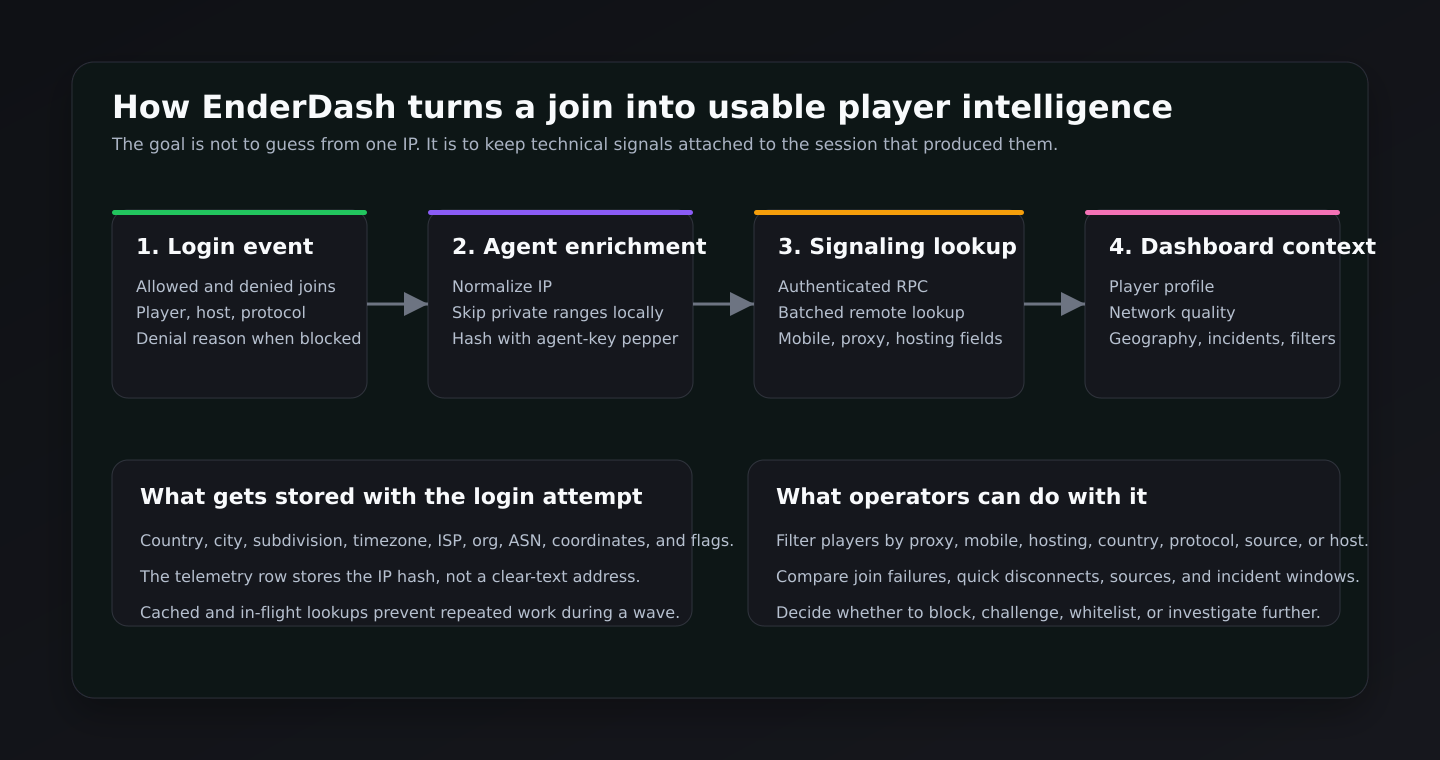
The current flow has a few important details:
- The agent normalizes the observed IP and skips private or reserved ranges locally.
- The telemetry store uses a SHA-256 hash of the IP with the agent key as a pepper. The clear-text IP is not displayed as a dashboard field.
- Lookup results are cached by that hash, and in-flight lookups are shared so a wave does not create repeated work for the same address.
- The agent sends the lookup through the authenticated signaling connection.
- The signaling service batches remote lookups and requests fields such as country, city, timezone, ISP, organization, ASN,
mobile,proxy, andhosting. - The agent stores the enrichment on the login attempt, then uses that profile when building session, player, geography, quality, and incident views.
The remote lookup path is compatible with the ip-api batch endpoint, including the mobile, proxy, and hosting fields. In production, the lookup base URL and key can be configured by the service environment.
What EnderDash shows you
The useful part is not the lookup by itself. It is where that lookup appears.
In the Audience workspace, EnderDash gives you several angles on the same evidence:
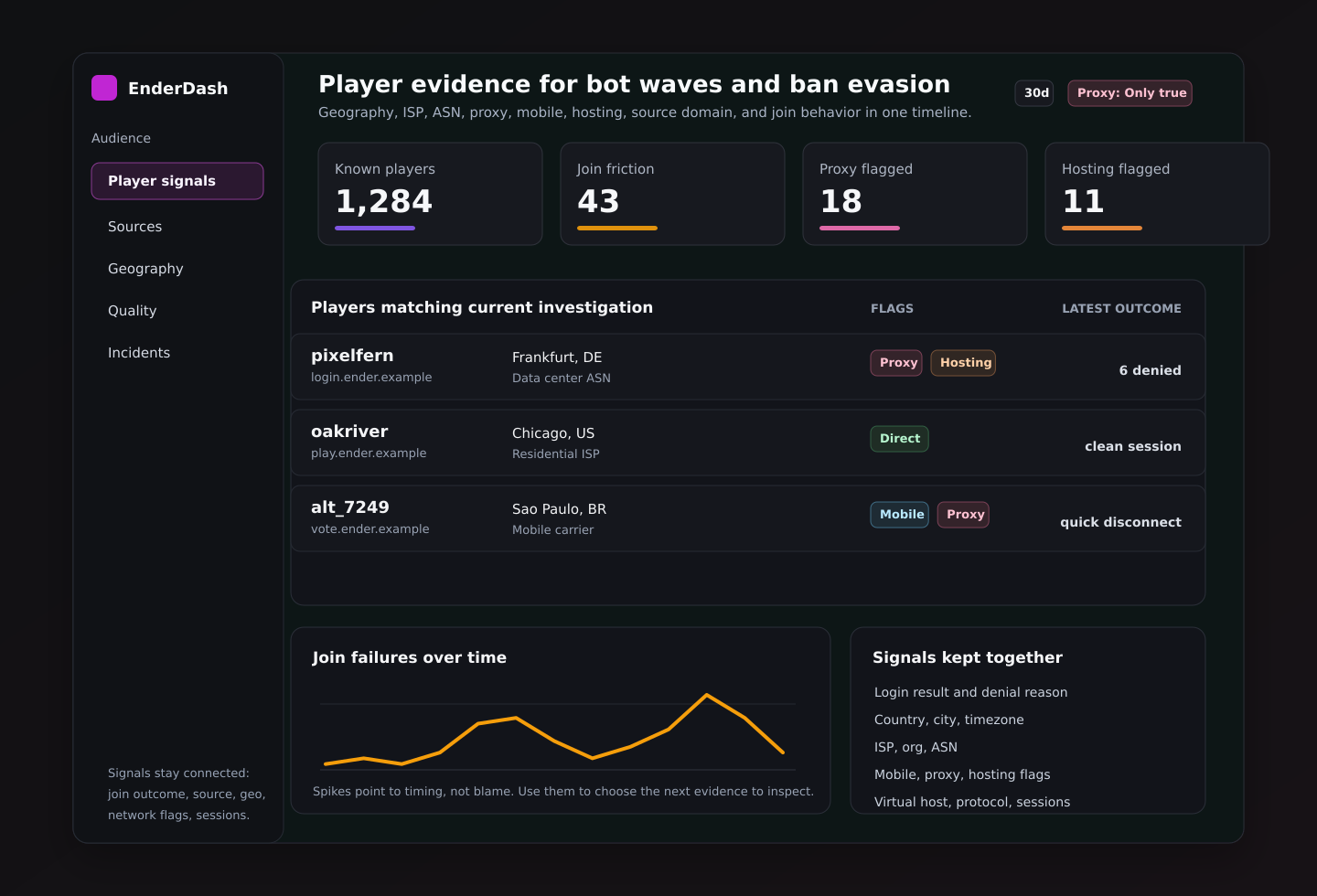
- Overview shows known players, new players, currently online players, join failures, quick disconnects, recent activity, top playtime, and top activity.
- Sources groups sessions by source domain and shows attribution coverage, active players, bounce rate, repeat rate, and domain mix over time.
- Geography shows countries, cities, subregions, and map points after enrichment.
- Quality breaks down bounce rate, repeat rate, median session length, join failure rate, and network quality by direct, mobile, proxy, and hosting segments.
- Incidents derives windows such as join-failure spikes and bounce spikes, then shows players lost, join failures, quick disconnects, and top impacted domains.
- Players lets you search and filter players by country, source, virtual host, protocol, mobile, proxy, and hosting flags.
The player profile also carries the evidence down to the individual player:
- first seen and last seen
- likely source and preferred domain
- country, city, region, ISP, ASN, timezone, and local time
- latest protocol and virtual host
- mobile, proxy, hosting, direct, online, and incident-adjacent badges
- recent sessions, recent activity, related incidents, and login attempts
That makes the review less brittle. You are not copying a name from console, checking a ban list, opening a separate GeoIP site, and trying to remember which incident happened first. The evidence lives together.
How EnderDash detects incident-shaped behavior
EnderDash does not label a player as a bot from one field. It derives operational incidents from timing and session behavior.
Two of the most useful incident shapes for this topic are:
- Join failure spike: at least three denied login attempts in a five-minute bucket.
- Bounce spike: at least three quick disconnects in a fifteen-minute bucket. A quick disconnect is a session that lasts five minutes or less.
Those thresholds are intentionally simple. They are not a magic anti-bot classifier. They are meant to point an operator at the windows where the server's player behavior changed.
From there, you inspect the players, domains, countries, protocols, mobile/proxy/hosting flags, and recent activity around that window.
Where anti-VPN, anti-proxy, and anti-bot plugins fit
EnderDash gives you visibility. Enforcement still belongs in the layer that can act before or during login.
As of April 30, 2026, examples worth evaluating include:
| Tool | Layer | Useful when | Notes |
|---|---|---|---|
| Sonar | Anti-bot plugin | You need connection checks, bot-wave handling, and configurable verification behavior | Evaluate platform support and configuration carefully before using it on a production proxy |
| LimboFilter | Velocity anti-bot filter | You want suspicious joins held in a limbo-style verification layer before they reach backend servers | Good fit for proxy-first networks, but still needs tuning |
| Shadow | Anti-bot and connection filtering | You want rate limits, country controls, cooldowns, and connection filters inside the server/plugin layer | Newer tools can move quickly, so check current maintenance before relying on them |
| Kauri AntiVPN | Anti-VPN plugin | You want a Paper-side VPN/proxy block action with configurable behavior | Best used with clear bypass rules for trusted players |
| AntiVPN.io | Anti-VPN and risk service | You want a dedicated VPN, proxy, alt, geoblocking, and risk-scoring service | Useful when you want a managed reputation source instead of maintaining lookup logic yourself |
There are also network-edge services and Minecraft reverse proxies that can help with larger attacks. That matters because a plugin cannot absorb a serious volumetric DDoS. Plugin-level anti-bot logic is for Minecraft protocol behavior and login flow. Network-edge protection is for traffic volume and upstream filtering.
A practical response flow
Use a layered response. Start narrow, then widen only if the evidence supports it.
Check whether it is actually a wave
Look at the same time window in join failures, quick disconnects, new players, and source domains. If only one player looks odd, investigate that player. If many accounts appear together, treat it like a campaign.
Separate proxy, hosting, mobile, and direct traffic
Use the mobile, proxy, and hosting filters. Hosting plus many new accounts plus denied attempts is a very different signal from one long-time player on mobile data.
Inspect the player profile before banning
Check first seen, last seen, recent sessions, login attempts, country, city, ISP, ASN, virtual host, protocol, and activity. A player with normal playtime and consistent behavior deserves a different decision than a throwaway account in a spike.
Apply the smallest useful control
Prefer targeted actions first: challenge proxy traffic, block a hosting ASN, temporarily tighten new-player checks, require registration, or add a short cooldown. Country-wide or ASN-wide blocks can solve one problem and create several support tickets.
Review after the change
Watch the same EnderDash views after the control is active. If join failures fall but legitimate players also disappear, your rule is too broad. If quick disconnects continue from a new network segment, the attacker moved.
What not to overtrust
Mobile networks are messy. They rotate addresses, share carrier NAT, and can look surprising in GeoIP data. A mobile flag should make you more careful, not more aggressive.
Some real players use VPNs for privacy, school networks, or unstable home routing. Look for nearby behavior: denied attempts, new account timing, short sessions, and source-domain patterns.
EnderDash is the investigation and operations layer. Anti-bot and anti-VPN plugins are still where you block, challenge, rate-limit, or reroute players during login.
A better way to think about bots
The goal is not to prove someone is a bot from a dashboard badge.
The goal is to make the next action less guessy.
If a wave is coming from hosting networks with repeated denied joins, short sessions, one source domain, and similar client versions, tighten the login layer there. If one normal player happens to be on mobile data, leave them alone. If a banned player seems to reappear through a proxy, inspect the timing, source, geography, ASN, protocol, and session history before deciding how hard to respond.
That is where EnderDash helps: it gives you the surrounding context fast enough to act while the incident is still happening.
Related articles
EnderDash is on Product Hunt
EnderDash is now listed on Product Hunt. Here is how we explain the agent-powered Minecraft operations workspace to a broader builder and server-admin community.
Can EnderDash upload custom JARs to Aternos?
EnderDash can make custom JAR uploads and Linux shell access easier on hosts that allow the agent, but it cannot bypass Aternos' free-hosting restrictions.
How to read Minecraft server crash reports
Learn how to work through Minecraft server crash reports, `latest.log`, and common failure patterns so you can find the real cause faster.